Week Year: Java Date Formatting With YYYY Instead of yyyy
The end-of-year gotcha lurking in your codebase

Problem Statement
Quick, without thinking too hard about it, what would you expect this code to print for the date 2025-12-28?
 var dateFormat = DateTimeFormatter.ofPattern("YYYY-MM-dd");
 var today = LocalDate.of(2025, 12, 28);

 IO.println(today.format(dateFormat));
In actuality, it prints…
2026-12-28
It’s a whole year off! How does that happen?
The problem is we’re using week year (YYYY) to format our date rather than Calendar Year (yyyy). Making this mistake can lead to dates that appear to be a year into the future in our log files, database tables, events, API calls, and business logic. If you’d never seen this issue before and were doing a code review, would you have caught a subtle bug like this?
Wait… “Week Year”?
A week year is used to represent a year in a week-based calendar system. Week-based calendars have the following properties:
- A year is composed of whole weeks (7-day blocks).
- Each week belongs entirely to a single year (weeks start on Monday).
- The first and last few days of a calendar year may actually belong to the previous or next week-year.
- A week-year can have 52 or 53 weeks.
The week year is used for systems that need ISO week-based reporting, or need to consistently aggregate data by week.
Which Date Formatting Combinations Make Sense
This table enumerates the year/week combinations you’re likely to run into. There are some cases that clearly make sense and you’d expect to see in common use, and there are some that should make you stop and consider if they are valid or not.
| Year Format | Week/Month Format | Description | Valid? |
|---|---|---|---|
yyyy | MM | Calendar Year with Calendar Month | Yes |
YYYY | ww | Week Year with Week in Year | Yes |
YYYY | MM | Week Year with Calendar Month | No |
yyyy | ww | Calendar Year with Week in Year | No |
As always, there may be cases where combinations I’ve listed as not valid are valid for your use case. I can imagine a legacy system somewhere that was built using yyyy-ww instead of YYYY-ww and the business has come to depend on this broadly incorrect but correct-for-us logic. But this table is a good starting point.
How Do I Fix This?
If your codebase is small or doesn’t do a lot of date formatting/parsing, manually searching for YYYY and making sure you aren’t using it for a legitimate week year case might be the quickest way.
Otherwise, OpenRewrite has a rule called ReplaceWeekYearWithYear that can be applied to your project.
All sources parsed, running active recipes: org.openrewrite.staticanalysis.ReplaceWeekYearWithYear
Changes have been made to src\main\java\com\ginsberg\SomeExampleCode.java by:
    org.openrewrite.staticanalysis.ReplaceWeekYearWithYear
Please review and commit the results.
NOTE: This has been fixed in OpenRewrite as of v2.25.0 ofrewrite-static-analysis.As of this writing, OpenRewrite’s ReplaceWeekYearWithYear rule will incorrectly convert legitimate (YYYY-ww) instances ofYYYYtoyyyy. So review any output it generates (as the build output tells you to!) or be very positive you do not have a legitimate use case.
No matter how you decide to fix this (manual or semi-automated), you’ll probably need to go through all of the dates that were generated and correct those as well. This becomes especially tricky when you’re dealing with immutable data such as financial transaction records or audit records. Good luck!
Tools To Prevent This
Fixing any existing uses of week year is great, but we should make sure we don’t add any additional code like this in the future. I’ve found a few ways to prevent this from happening, I’m sure there are more.
IntelliJ IDEA Warnings
IntelliJ IDEA has tools to catch this as you edit code. First, a simple highlight in the editor when it detects YYYY used incorrectly (note it does not highlight the correct case).
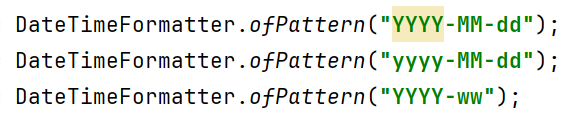
It’s also interesting to note that IntelliJ IDEA correctly ignores the legitimate YYYY-ww use case.
IntelliJ IDEA Code Inspection
IntelliJ IDEA’s built-in code analysis (Right Click -> Analyze -> Inspect Code) also produces a warning for suspected incorrect uses.
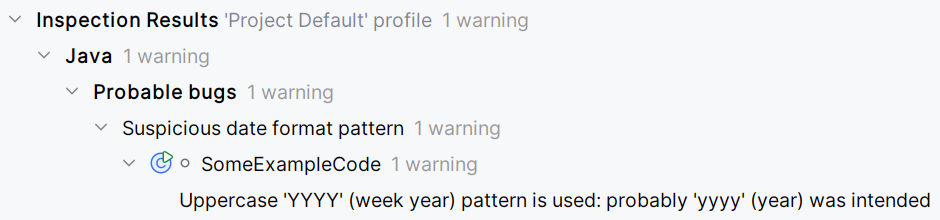
The code inspection can also be used to correct YYYY to yyyy. And again, legitimate use cases are not flagged here.
ErrorProne
One tool I like using in general is Google ErrorProne, a static analysis tool that catches common errors at compile time. Among its many useful rules, MisusedWeekYear will fail the build when it detects an improper use of YYYY.
SomeExampleCode.java:24: error: [MisusedWeekYear] Use of "YYYY" (week year) in a date pattern
    without "ww" (week in year).

    You probably meant to use "yyyy" (year) instead.

    var dateFormat = DateTimeFormatter.ofPattern("YYYY-MM-dd");
                                              ^
    (see https://errorprone.info/bugpattern/MisusedWeekYear)

    Did you mean 'var dateFormat = DateTimeFormatter.ofPattern("yyyy-MM-dd");'?
Note: For truly legitimate cases (you probably don’t have one, see the table above), you can turn this warning off on a case-by-case basis with @SuppressWarnings("MisusedWeekYear"). The MisusedWeekYear rule does correctly ignore legitimate YYYY-ww use cases.
TL;DR
- There are legitimate reasons to use
YYYYbut it is not common, so be mindful of it. - There are tools to correct this at scale (I really hope you don’t have this problem at scale).
- There are tools to prevent this from happening in the first place.